MisTTY
MisTTY is a major mode for Emacs 29.1 and up that runs
a shell inside of a buffer, similarly to comint mode. It is built on
top of term.el. Check out its project page at
https://github.com/szermatt/mistty.
M-x mistty creates a buffer with an interactive shell. See Launching for details.
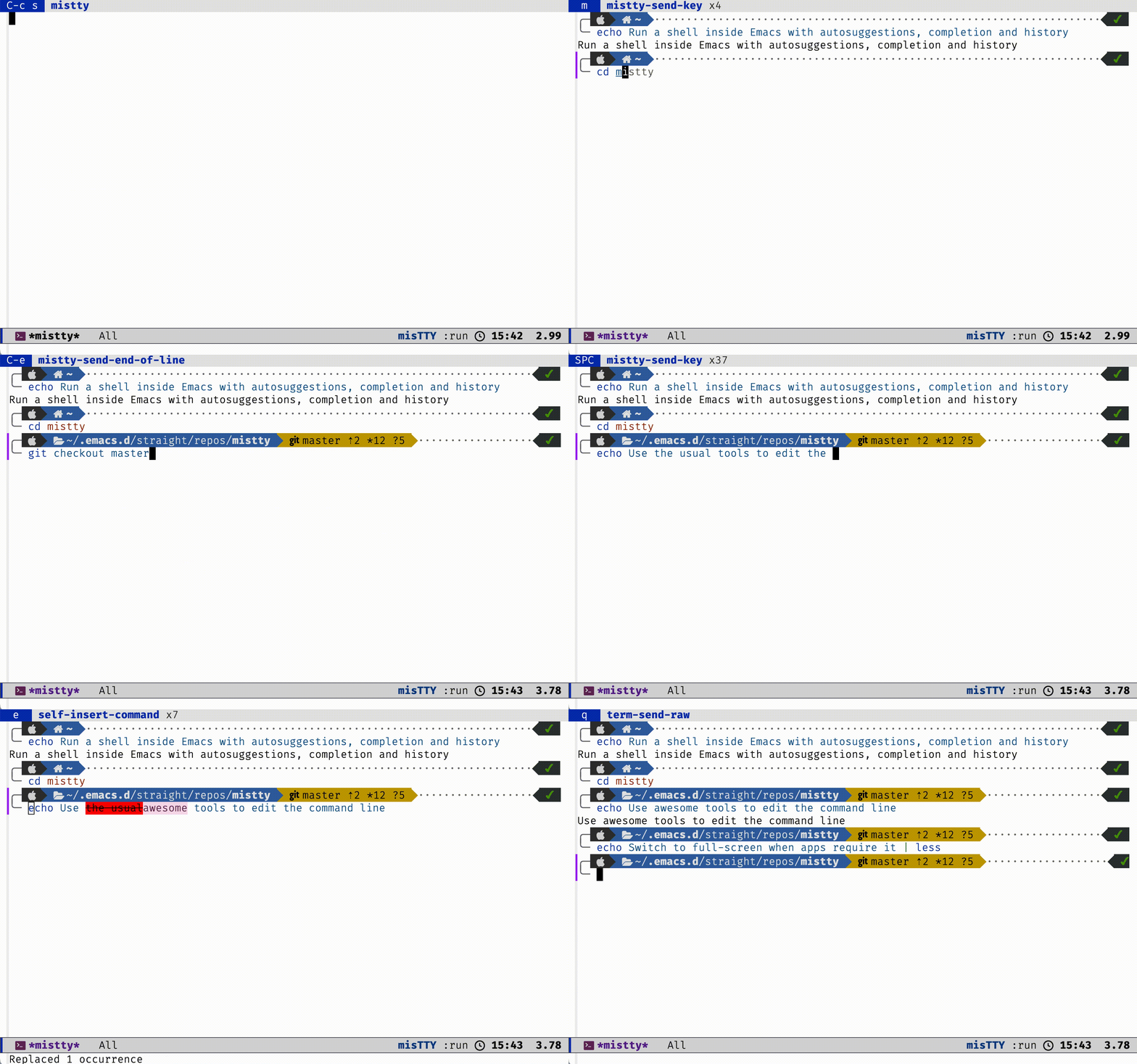
MisTTY feels very much like comint mode: you can move around freely and run any Emacs command you want - until you press TAB and end up with the native completion or notice the shell autosuggestions. With MisTTY you have access to both Emacs and the shell commands and editing tools.
Additionally, commands that take over the entire screen, such as less or vi also work, temporarily taking over the window, while scrollback remains available in another buffer.
MisTTY works well with Bash and ZSH, but it is especially well suited to running Fish: you get autosuggestions, completion in full colors. Here’s what the end result might look like:
MisTTY is known to work on Linux and MacOS. It also supports non-shell command-line programs, such as python.
The latest version of this documentation is available at https://mistty.readthedocs.io/en/latest/. Once MisTTY is installed, this documentation can be accessed from inside Emacs using M-x info gmistty
Note
If you encounter issues, please take the time to file a bug. See Reporting issues for details.